
A few months ago, Mozilla made a change to its terms of use for Firefox, where it asserted:
When you upload or input information through Firefox, you hereby grant us a nonexclusive, royalty-free, worldwide license to use that information to help you navigate, experience, and interact with online content as you indicate with your use of Firefox.
This is clearly insane, and I have been using LibreWolf ever since. LibreWolf is a privacy focused fork of Firefox.
Overall switching to LibreWolf has worked out well. I don't think LibreWolf really deviates significantly from Firefox at all, it just sets some of Firefox's settings to favour privacy.
However, LibreWolf is not really set up to be user friendly out of the box and it requires a small amount of up front effort to make it work well. The main points of friction are:
Cookies are cleared when closing the browser, so you are logged out of every site every time you re-open the browser.
You can set up site specific exceptions for the sites you want to remain logged in to. This sounds annoying but I realised I only want a persistent login on a very small handful of sites. So overall this is a huge privacy win for a small up front cost in effort. Three months later, I only have exemptions for 6 sites and it works exactly as I want.
LibreWolf will not save passwords by default.
The FAQ states "We suggest that you use a more robust solution than the built-in password manager available in the browser". I found this annoying (especially with the fact that cookies are cleared), but I used KeepassXC anyway (without browser integration) so I bit the bullet and set up browser integration. It actually works very well and I'm happy with it, and it means that the password database can easily be backed up and shared between devices.
Setup is a little unintuitive though, as KeepassXC creates a JSON file in a Firefox specific location, which you have to copy or link to the LibreWolf directory:
- Set up KeepassXC for browser integration with Firefox. From KeepassXC, select Tools → Settings → Browser Integration, then enable it for Firefox
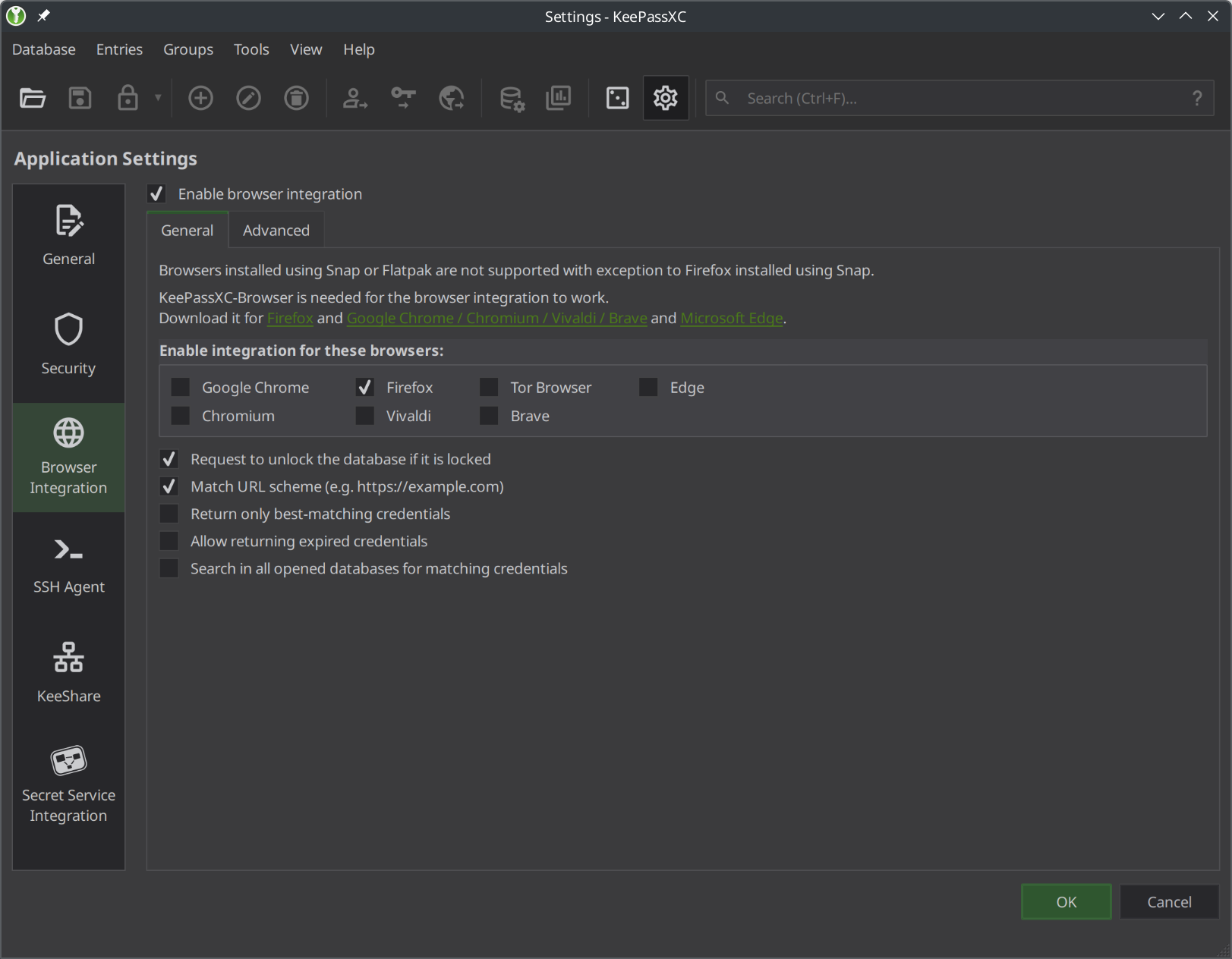
- Copy or link the configuration from Firefox to LibreWolf
$ mkdir -p ~/.librewolf/native-messaging-hosts && \
  ln -s ~/.mozilla/native-messaging-hosts/org.keepassxc.keepassxc_browser.json \
    ~/.librewolf/native-messaging-hosts/org.keepassxc.keepassxc_browser.json
(Annoyingly, neither LibreWolf nor Firefox does respects XDG_CONFIG_HOME)
Install the extension from https://addons.mozilla.org/en-GB/firefox/addon/keepassxc-browser/
Restart LibreWolf and you should start seeing prompts within LibreWolf on password fields and after logging in to websites.
I'm happy with this. It works very well and is slightly superior to the browser's password manager as I can sync the the password database and store other metadata in there. So, as with the cookies, there is a small initial cost in effort but the end result is good.
Resist fingerprinting prevents using dark mode.
The logic is sound that enabling dark mode gives another bit of identifiable information, but I think that the user should be able to make that choice. Personally I would prefer dark mode. This pushes users to rely on extensions to provide dark mode, which is not great from a security perspective (or usability, in my experience of trying one such extension).
Mozilla has added a sort of unofficial workaround for this, as described by Tom Ritter here: https://bugzilla.mozilla.org/show_bug.cgi?id=1732114
In about:config, set:
 privacy.resistFingerprinting = false
 privacy.fingerprintingProtection = true
 privacy.fingerprintingProtection.overrides = +AllTargets,-CSSPrefersColorScheme
You now have effectively have Resist Fingerprinting enabled, but with dark mode.
Conclusions and caveats
Overall I am very happy with LibreWolf. It tooks a little bit of time to set up to my liking, but the end result is better from a privacy perspective than using stock Firefox, and roughly equal from a usability perspective.
The biggest potential problem with using LibreWolf over Firefox is that you rely on the relatively small LibreWolf team continuing to maintain your browser and deliver security patches on time. The browser is easily the most exposed part of your system, so it is critical it is patched promptly.
How this will play out in future remains to be seen, but here's an interesting anecdote: There was recently a security advisory to update Firefox to 138.0.4. I am running Fedora, and Firefox comes from the Fedora updates repository whereas LibreWolf comes from a custom repository maintained by the LibreWolf developers. A few hours after the advisory was released, the LibreWolf developers had pushed the update into their repository but the Fedora developers had not. While the slower Firefox rollout is the fault of Fedora rather than Firefox, the fact that LibreWolf saw a quick update is very impressive.
If you want a LibreWolf equivalent for Android, look into IronFox.